 |
|
Questions? E-mail us
or call us 302-584-1771, 8AM to 10PM U.S. East Coast Time 7 days a week
|

The Analysis ToolPak
The Analysis ToolPak is an add-in for Microsoft Excel that comes with Microsoft Excel. An add-in is simply a hidden workbook that adds commands or features to Excel.
Typically the Analysis ToolPak is installed when one installs Excel. To see if this is the case for your machine do the following:
- Excel 2003 and earlier: select in Excel the Tools Menu and the menu item Add-ins.
- Excel 2007: Office Button, Excel Options, Add-ins, Manage Excel Add-ins in the selection box, then click GO
- Excel 2010: File, Options, Andd-ins, then click GO
A dialog like the following will appear:
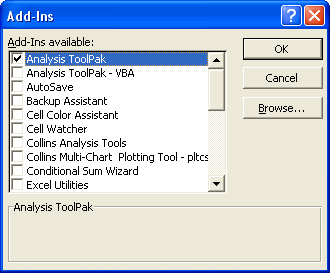
If you have the Analysis ToolPak installed it will be listed in the above add-ins available list. If it is there just click on its checkmark and then OK to open it. It will then open automatically each time you open Excel.
If you do not see the Analysis ToolPak in the above list then you need to get your Microsoft Office or Microsoft Excel CDs and do a custom install. Typically this would be done via the Control Panel and the Add/Remove Program Features. Select Microsoft Excel and the change option. Then drill down on the add/change features until you can select the Analysis ToolPak for installation.
Do not mistake the Analysis ToolPak - VBA for the Analysis ToolPak. The Analysis ToolPak - VBA is for use in macros. The Analysis ToolPak is for interactive use.
Once installed, the Analysis ToolPak adds a menu item to the Tools menu named "Data Analysis...". Clicking on this option displays the following dialog:
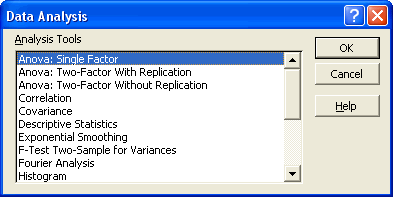
There are a total of 19 options available in the above dialog:
-
Anova: Single Factor
-
Anova: Two-Factor with Replication
-
Anova: Two-Factor Without Replication
-
Correlation
-
Covariance
-
Descriptive Statistics
-
Exponential Smoothing
-
F-Test Two Sample for Variance
-
Fourier Analysis
-
Histogram
-
Moving Average
-
Random Number Generation
-
Rank and Percents
-
Regression
-
Sampling
-
t-Test: Paired Two Sample for Means
-
t-Test: Two-Sample Assuming Equal Variances
-
t-Test: Two-Sample Assuming Unequal Variances
-
Z-Test: Two-Samples for Mean
In addition to accessing these features via the above dialog you will find many new statistical functions to the available function list.
To use these tools you need to be familiar with the specific area of statistics or engineering that you want to develop analyses for. The following locations provide detailed explanations on using the above tools:
If you prefer a book, Running Microsoft Excel 2000 by Mark Dodge and Craig Stinson and published by Microsoft Press, goes into great detail on the Analysis ToolPak. It most likely is available through Amazon.com.
Alternatives to the Analysis ToolPak
-
Histogram Creator - create great looking histograms via a menu driven approach
-
Random Number Generator- create random numbers the easy way
-
Random Sampler - Menu driven approach to sampling your data
| Copyright 2026 Add-ins.com LLC, all rights reserved. Spreadsheet Assistant is a registered trademark of Add-ins.com LLC. |