 |
|
Questions? E-mail us
or call us 302-584-1771, 8AM to 10PM U.S. East Coast Time 7 days a week
|

Addin Information Lister for Microsoft Excel
|
The Addin Information Lister for Excel not only provides a way to list your add-ins, but it provides easy access to installed VBA add-ins and COM Add-ins. It is compatible with Microsoft Excel 2013-2024 and Excel for Office 365.
The Add-In Information Lister provides a list of all installed VBA add-ins for Excel, their file location, and their opening order. For example:
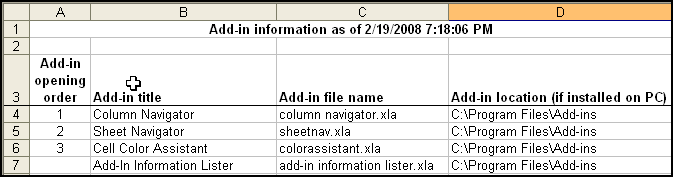
If you un-install an add-in via Tools/Add-ins and un-checking the add-in, Excel will frequently drop the add-in from the list. If you do not know where the add-in file is located, it becomes difficult to add back. This add-in is also useful if you have gotten a new machine or are re-installing Excel as it creates a list in a new workbook of all your installed and opened add-ins.
Managing COM add-in access is difficult to do in Excel. Unfortunately, COM add-ins frequently cause memory problems. Removal of unneeded COM add-ins that sneak into your Excel install is essential to keep Excel from crashing.
Download Now - the Add-in Information Lister is free - no purchase required. Does not expire. No nag screens.
| Copyright 2026 Add-ins.com LLC, all rights reserved. Spreadsheet Assistant is a registered trademark of Add-ins.com LLC. |