 |
|
Questions? E-mail us
or call us 302-584-1771, 8AM to 10PM U.S. East Coast Time 7 days a week
|


Risk Analyzer
|
Screen shots: 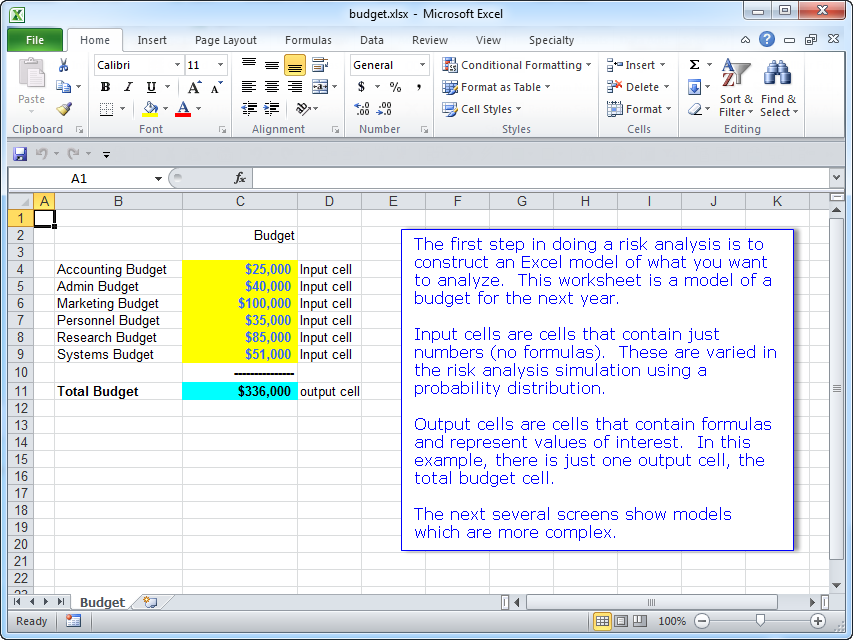 |
If you are evaluating an investment proposal, a new business, a budget, a proposal involving financial risk, or a scientific study, then the Risk Analyzer add-in for Microsoft Excel is the tool for you. It is compatible with Microsoft Excel 2013-2024 and Office 365.
The Risk Analyzer gives you tables and graphics that illustrate the risks of the proposal.
| Click on the following to see enlarged images: |
) |
) |
In addition to result charts like the one above, the Risk Analyzer also gives you histograms that show cumulative probabilities and tornado charts that show the sensitivity of the output variables to your input variables.
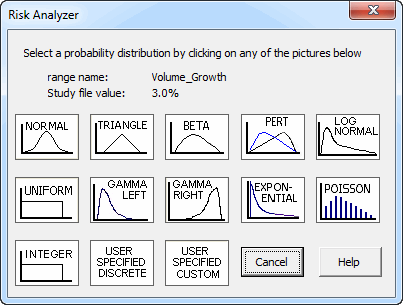
The Risk Analyzer works by doing Monte Carlo simulations. Monte Carlo simulation is simply the creation of many "what if" cases to determine the expected results of a study. You do not need to know statistics or how to write probability formulas in order to use the Risk Analyzer. It is unnecessary to embed custom functions into your workbooks. All you need to know is what values your input variables are likely to have: the minimum and maximum values and the distribution shape (uniform normal or skewed in one direction). The following illustrates the different types of distributions that are available, each of which can be customized to your needs:
The following is a sample Excel Model (PDF format):
-
Excel model of a construction estimate and profit - constructed by the user
The following are worksheets and reports (PDF format) constructed by the Risk Analyzer.
- Sample risk premises worksheet
- Sample Input Variable Distribution Report
- Sample output sensitivity graph
- Sample output sensitivity table
- Sample simulation results
- Sample total estimate results
Key features of the Risk Analyzer:
-
Extremely fast flexible and completely menu driven for ease of use.
-
Designed and written by users for users.
-
You do not put any special functions into your workbooks, which allows you to share your workbooks with others who do not have the Risk Analyzer. Many other Monte Carlo simulation programs embed special functions that require all users of the workbooks to purchase their expensive programs.
-
Easy to learn - you do not need to attend expensive training courses to learn how to use. Three helpful example files with step by step instructions show you how to use the Risk Analyzer. There is also an extensive help file.
-
No annual support contract required to talk to a support person for help. If you need assistance just call us. Our free help doesn't expire.
-
Your input variables (cells) and their distributions are listed on a special premise sheet for you to conveniently review.
-
Customizable probability distribution. You do not need to create a distribution for each input cell - use one distribution for a group of related cells.
-
Probability distributions can have minimum and maximum allowed values so that you do not get extreme, unrealistic values in your studies
-
You can have as many input and output variables as you need
-
Worksheets are created that list all the simulations with the values of all the output variables and input variables
-
Easily set your workbook to the input values in any simulation so that you can check your model's calculations
-
Easily set your workbook back to its original values once you are done
-
-
Easy to understand reports
-
Select which input and output variables to use when doing a Monte Carlo analysis so that you can easily perform "what if" studies on any subset of your input and output variables.
-
Very very fast - do thousands of evaluations in minutes.
-
"What if " capability that allows you to type in a value and see what the probability of occurrence is for that value.
-
Customizable histograms that have step sizes, number of bins (bars), and minimum and maximum values for ease of use and interpretation.
-
The Risk Analyzer add-in is loaded only when you need it instead of loading every time you open Excel.
-
Easy to use installation program.
-
Frequent free upgrades as we conscientiously add features our users suggest.
-
Reasonably priced.
If you want to try a copy before buying, download a trial version now!
We get asked often if one can use monte carlo simulation and the Risk Analyzer for a particular use. We reply that Monte carlo simulation is basically having the Risk Analyzer (or any monte carlo simulator) entering into 2 to several hundred input cells random values based on probability distributions specified for those cells. The Risk Analyzer then calculates the results, storing the results (output cells), and repeating. After a number of repetitions, typically anywhere from 2,000 to 50,000, the results are then presented in a distribution chart and table for each output cell. If you have a situation that can be modeled in an Excel spreadsheet, have a good idea of the distributions, the Risk Analyzer and monte carlo simulation will work for you.
Another question we get asked is how long does it take to do a simulation. Let's say you are considering investing in a new proposal of some sort. Our response for this is anywhere from a few hours to a few hundred hours. So where is that time spent?
- To fully understand the risks, you should spend many hours, if not hundreds of hours, identifying all the factors that will affect the proposal. For example, product price, market size, production costs, and 20 to 30 other factors. For each factor you estimate the range it can be and the distribution (normal or skewed) And this work is not done in a vacuum. It is done by interviewing and talking to experts and others who have done similar investments. This is 95% of your work.
- To create the excel spreadsheet of your proposal, which gives you a single output estimate of net present value, IRR, and cash flows based on the most likely values of all your factors will take about 10 hours to create.
- Next, you then open the Risk Analyzer for the first time. Doing the examples to help you understand how to use takes about one hour. The Risk Analyzer is easy to understand and use. We designed it that way. Creating a premise file for your study using your knowledge from the first step above and the Risk Analyzer takes an hour or two.
- Now you run the simulations. Typically 25,000 simulations are needed. This takes 2-5 minutes. Computers are fast.
- You spend another 10-20 hours, mostly on steps 1 and 2. Running simulations is just an hour or two.
- Overall, you spent in the above example almost all of your time hours studying and modeling the proposal and not using the Risk Analyzer or any simulator. The use of the Risk Analyzer? Several hours including learning how to use.
We sometimes get asked the question why does the Risk Analyzer cost only $49.95 and does it have all the features of other monte carlo simulators. That's an easy one. We want to include it in our business and risk analysis collections. So pricing it any more than that would make our collection prices look strange. And, we want to make it affordable. With regard to features, it has lots of features, Every monte carlo simulator has different features, some unique. Our unique feature is a risk analysis funnel chart, showing risk over time. We have all the popular probability distributions, all that 99% of users will need. And you can build your own custom distributions. Most importantly, the Risk Analyzer is easy to use.
The above answer often triggers the question why do others sell their monte carlo simulation programs for several hundred and up to thousands of dollars. And, they want you to take training courses on how to use. Excellent question! That's one we won't answer, but the word that comes to our mind is, well, greed. For a comparison to other risk analysis software and for features and issues one should consider when purchasing risk analysis software, visit our risk analysis software comparison page.
And we then ask you the question: do you want to spend your money on expensive software that requires lots of training? Especially when your time and energy should be spent understanding your proposal, not the simulation software. Your choice!
|
Order online from our secure service. |
|
US $49.95 |

Customers who viewed the Risk Analyzer also viewed:
- Multi-Cell Goal Seeker - Do goal seek on multiple cells automatically.
- Sensitivity Analyzer - Do numerous "what if" and sensitivity analysis cases in seconds.
- Sensitivity Chart Creator - Easily create sensitivity or tornado charts.
| Copyright 2026 Add-ins.com LLC, all rights reserved. Spreadsheet Assistant is a registered trademark of Add-ins.com LLC. |