 |
|
Questions? E-mail us
or call us 302-584-1771, 8AM to 10PM U.S. East Coast Time 7 days a week
|


|
Column Navigator
|
The Column Navigator add-in for Microsoft Excel helps you move around on worksheets that have many columns. It is compatible with Microsoft Excel 2013-2024 and Office 365.
With just a click of the new "Columns" menu, a dialog appears that lists all the columns in your worksheet. You can have the Column Navigator show the columns in actual order or sorted by title in A-Z order.
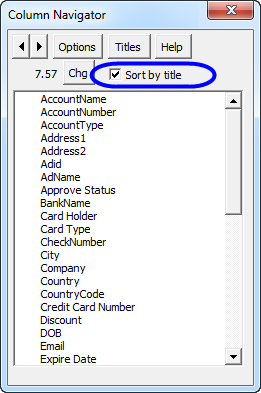
To go to any column, just click on the column description. To change worksheets, just click on the spin buttons on the upper left of the above dialog. The "titles" button allows you to change the title rows to any rows you want. Multiple rows can be used as the column title rows. Once changed, the Column Navigator will remember the rows.
Key features:
- If you wish to see your columns in sorted order, just click on the "Sort by title" checkbox.
- If you wish to see the column widths on all columns, just click the Options button and select the option to show column widths on all columns.
- If a column is hidden, an "H" appears to the left of the column title if widths are not displayed. If widths are displayed, hidden columns have a zero for their width.
- The size of the dialog can be customize to any width or height for better viewing
|
Order online from our secure service. |
|
US $19.95 |

Customers who viewed the Column Navigator also viewed:
- Backup Assistant - Automatically backup files when you open them and before you modify them (or back them up at your convenience).
- File Assistant - See a list of the past 100 files you have opened! Easily re-open any file.
- Row Extractor - Extract rows of data into columns for easy review and printing.
- Sheet Navigator - Move from sheet to sheet with great ease. View a list of all your sheets with one click!
- Spreadsheet Assistant - Add over 200 time saving features to Excel.
| Copyright 2026 Add-ins.com LLC, all rights reserved. Spreadsheet Assistant is a registered trademark of Add-ins.com LLC. |