 |
|
Questions? E-mail us
or call us 302-584-1771, 8AM to 10PM U.S. East Coast Time 7 days a week
|

|
Favorite Bookmarks
|
The Favorite Bookmarks add-in for Microsoft Excel allows one to create a list of favorite directories and favorite workbooks and quickly and easily open them. It is compatible with Microsoft Excel 2013-2024 and Office 365.
In addition to bookmarking a workbook, one can bookmark folders, sheets and ranges. The following picture illustrates a typical favorites list, which appears when you click on the Favorite Bookmarks' toolbar button:
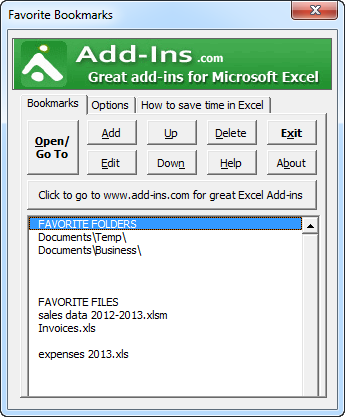
To open a file or a folder, one just selects it in the list and clicks on the Open/Go To button. Or one can double click a bookmark to open it. Options allow you to keep the Favorite Assistant dialog open or have it close automatically when you open files. Other options allow one to resize the dialog so you can see more bookmarks and make the dialog wider. Multiple files in different directories may be opened at one time.
When one clicks the Add button, one can add bookmarks to:
- open workbooks
- close workbooks
- folders
- worksheets
- ranges and ranges names
In addition, one can add blank rows, labels, and move bookmarks up and down to arrange them in any order you want.
We are giving away Favorite Bookmarks to illustrate how one can save time using our add-ins for Excel. Favorite Bookmarks is just one feature of one of our add-ins, the Spreadsheet Assistant. The Spreadsheet Assistant adds over 200 time saving features to Excel. The features are fully integrated with the Excel menus for ease of use.
| Copyright 2026 Add-ins.com LLC, all rights reserved. Spreadsheet Assistant is a registered trademark of Add-ins.com LLC. |