 |
|
Questions? E-mail us
or call us 302-584-1771, 8AM to 10PM U.S. East Coast Time 7 days a week
|


|
Name Splitter
|
The Name Splitter add-in for Microsoft Excel can quickly and easily split names that are in one cell into individual names in individual cells. It is compatible with Microsoft Excel 2013-2024 and Office 365.
Suppose you have a list like this:
|
or this |
|
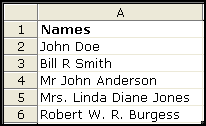
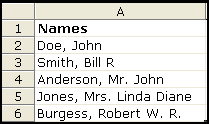
The Name Splitter will convert this to a table like the following:
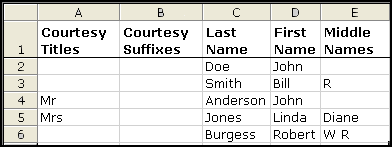
The Name Splitter has over 150 courtesy titles and suffixes (including military titles) that it looks for and puts in the courtesy titles and suffixes columns. And you can easily create and use your own custom list of titles and suffixes.
Another feature of the Name Splitter will convert a list of names in "Last Name, First Name" order to "First Name Last Name". If you have company names mixed in with your people names, the Name Splitter has several options to prevent them from being modified.
In addition to being able to split names, the Name Splitter can also separate names from addresses. For example if you have in a cell "George Burdell 1 Techwood Drive" the Name Splitter can split this into "George Burdell" in one cell and "1 Techwood Drive" in another.
Lastly, if you need to combine the split names back together, there is a feature in the Name Splitter that does that! This allows you to put the name in the order you want, and use the parts you want, for example, going to first name last name only.
|
Order online from our secure service. |
|
US $19.95 |

Customers who viewed the Name Splitter also viewed:
- Address Assistant - Easily split addresses in one cell into multiple cells. Fix zip codes needing leading zeros.
- CSV File Creator - Create CSV files the easy way, without Excel's warning messages.
- Data Cleaner - Eliminate tedious manual cleaning of data
- Duplicate Finder & Deleter - Quickly find and remove duplicates in one list or between two lists.!
- Word Shifter - Shift words from one cell to the next with just the click of a button.
| Copyright 2026 Add-ins.com LLC, all rights reserved. Spreadsheet Assistant is a registered trademark of Add-ins.com LLC. |